RogueFetch
Download, convert, and organize media.
RogueFetch is a Windows desktop utility from Rogue Gain that downloads, converts, and organizes supported online media using a clear local interface.
Free, no advertisements, no tracking popups, no nag screens.
Always the newest release. The portable edition, SHA-256 checksums and the release notes are all on the release page.
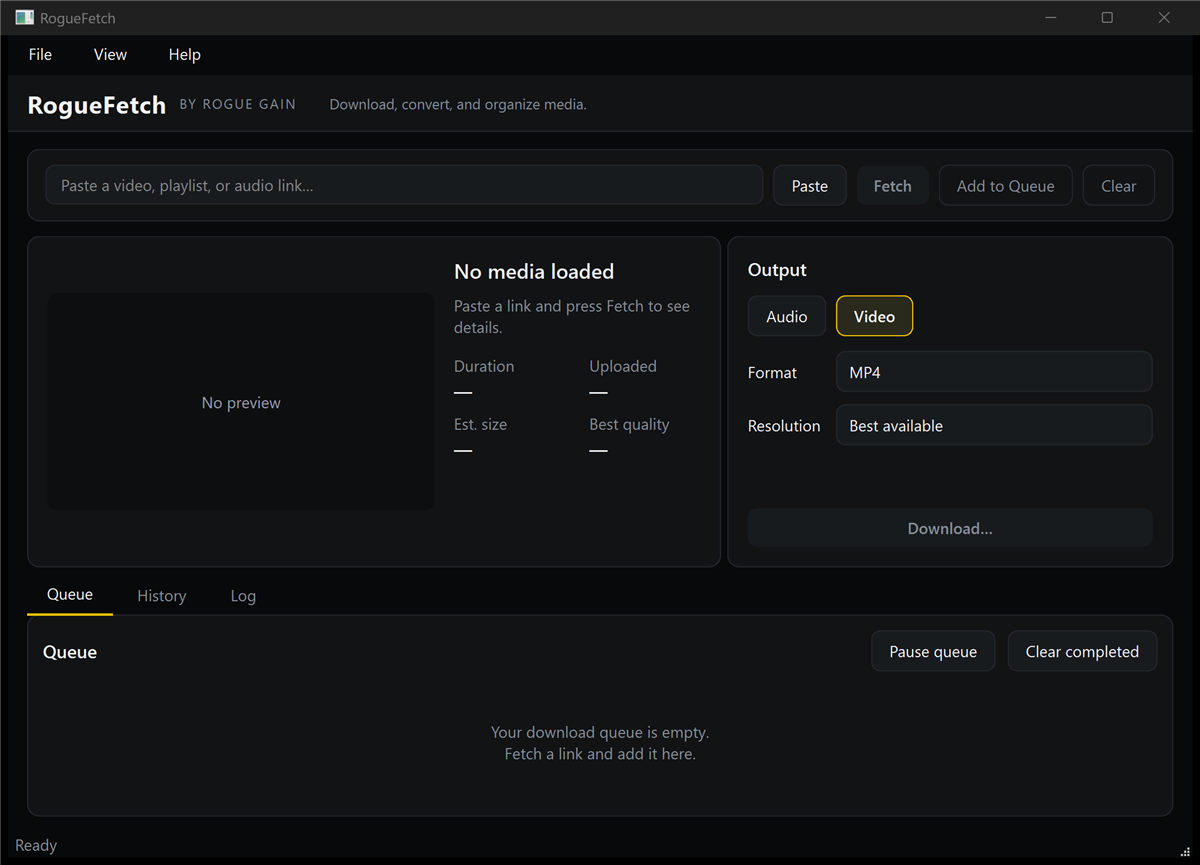
The interface
Everything in one window.
Paste a link, check what it found, choose an output, and let the queue run. The screenshot above is the actual application. Every element below is visible in it.
Link input
Paste, fetch, add to queue, clear. One field, four actions.
Metadata preview
Thumbnail, title, uploader, duration, upload date, estimated size.
Output controls
Audio or video, format, bitrate and resolution selection.
Queue
Pause the queue, clear completed, open or remove any item.
Progress
Percentage, speed, ETA, downloaded size against total size.
History & log
What ran, what finished, and a native Save As for every result.
Formats
Audio and video.
Audio
- MP3
- WAV
- FLAC
- M4A
- Opus
- AAC
Video
- MP4
- MKV
- WebM
Controls
- Bitrate selection
- Resolution selection
- Playlist support
- Queue management
- MusicMilk support
Specifications
What it needs.
Lawful use
What this tool is for.
RogueFetch is intended only for media the user owns, has permission to download, or is otherwise legally authorized to save.
Users are responsible for complying with copyright law and the terms of the services they access.
RogueFetch does not bypass access controls and does not support DRM-protected streams. It is a retrieval and conversion utility, not a circumvention tool.
Known limitations
What to expect.
Stated up front, because you will run into some of these.
- Builds are unsigned, so Windows SmartScreen may warn on first run.
- Some antivirus products flag PyInstaller-packaged applications.
- Supported websites change over time, and support is not guaranteed for any given site. RogueFetch updates its own download engine, so a site change is usually repaired within days without waiting for a new release, but some changes take longer and some sites are never supported.
- Authenticated content may require authorized cookies that you supply.
- DRM-protected streams are not supported.
- Access controls are not bypassed.
Recovery
Getting older filenames back.
Versions before 1.1.2 cut a filename short at a dot in the title. A track called “Artist ft. Someone – Song Title” was saved as Artist ft.mp3, because everything after the last dot was mistaken for the file extension. Where several downloads shortened to the same name they stacked up as (1), (2) and so on.
This is fixed from 1.1.2 onward, and files already saved keep the names they were saved with. They are recoverable, though: the truncation happened after the tags were written, so the files still carry their real titles. rename_from_tags.py rebuilds the names from those tags. It needs Python 3.10 or newer and FFmpeg: it uses the copy RogueFetch installed if it is there, and otherwise any ffprobe on your PATH.
It renames a file only when the rebuilt name actually starts with the surviving one, so it restores rather than guesses, and it reports anything it cannot rebuild instead of inventing a name. It changes nothing until you pass --apply, never deletes or overwrites, and writes an undo log that puts every name back.
Open source
RogueFetch bundles FFmpeg.
RogueFetch bundles FFmpeg, used under the GNU Lesser General Public License, version 3. The bundled binaries are unmodified. RogueFetch runs ffmpeg.exe as a separate process and links no FFmpeg library into itself.
The bundled build is ffmpeg-n7.1.5-2-g998de74adf-win64-lgpl-shared-7.1, from FFmpeg’s release/7.1 branch at commit 998de74adf, produced by BtbN/FFmpeg-Builds at release tag autobuild-2026-07-13-14-11.
The FFmpeg libraries ship as separate DLLs, so you can replace them with your own compatible build by swapping the files. No relinking is required. The full licence text and build provenance ship inside both packages.
- FFmpeg source ffmpeg-source-998de74adf.tar.gz
- Build scripts ffmpeg-build-scripts-BtbN-….tar.gz
- FFmpeg licence LGPL-3.0-or-later
- RogueFetch licence MIT
Download
Download RogueFetch
Free. Installer and portable edition, with SHA-256 checksums, on the release page. The link always points at the newest release.